Telegram App Store Removal: UGC Moderation Lessons
Telegram’s App Store availability concerns highlight why UGC apps need testable filtering, reporting, blocking and support systems before submission.
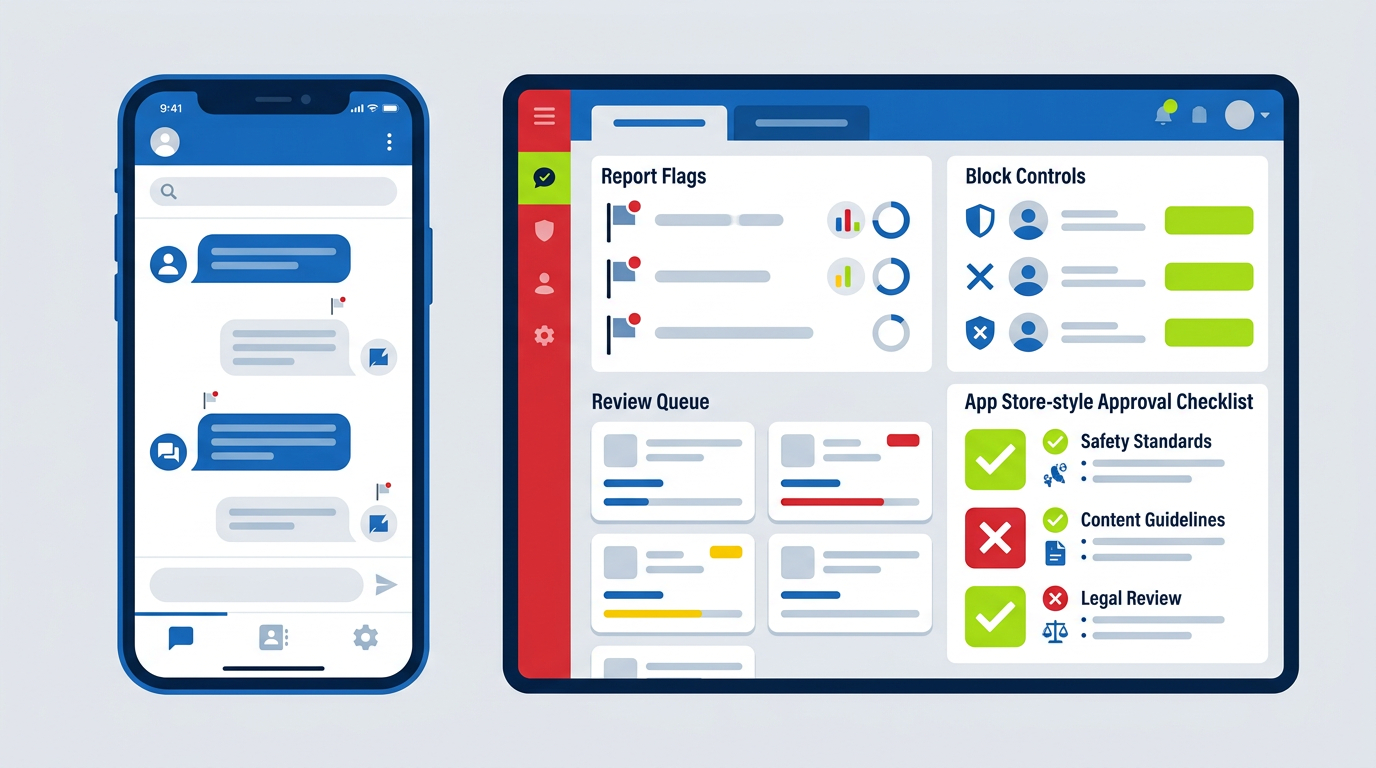
Telegram’s temporary App Store removal shows why user-generated-content apps cannot treat moderation as a policy-page exercise. Apple expects working filtering, reporting, blocking and contact systems that reviewers can test. If users can post, message, upload or trade, build those controls before submission, document them, and assign people to respond.
What happened with Telegram, and what app owners should verify before drawing conclusions
Reports about Telegram disappearing from Apple’s App Store tend to move faster than verified facts. Apple does not usually publish detailed public explanations for individual removals, and Telegram has operated through different country-store availability, app versions and policy disputes over time. I would not claim a precise Apple rationale unless it comes from Apple, Telegram or a clearly attributable regulatory record.
The useful lesson is broader: a messaging or community app can face App Store availability issues when illegal, harmful or otherwise policy-violating content is accessible through its product without adequate controls.
Apple’s concern is not limited to public social networks. It can apply to:
- Chat and messaging platforms
- Community forums
- Dating apps
- Marketplace listings
- Anonymous posting apps
- File-sharing tools
- Education platforms with student uploads
- Creator platforms
- Local service directories with reviews
- Donation, volunteer or donor communities
- Apps that embed user-posted content from another service
Telegram-style risk becomes much higher when content can spread quickly through channels, groups, forwarding, file uploads or public search. But even a small app with 500 active users can be rejected if Apple cannot find a reliable way to report abuse, block another user or contact the operator.
Apple reviews the product a user can access, not just the moderation policy written on your website.
For a recent Delhi NGO-oriented build, I had to think through this distinction early. A public information site is one thing. The moment a platform introduces donor profiles, volunteer submissions, messaging or public comments, it becomes a moderation product as well as a website. On projects such as Sarv Dharam Sewa Sangh and the Sarv Dharm Blood donor platform, the safer design decision is to minimise unnecessary public posting and collect only the information required for the service.
That is not anti-community. It is risk-aware product design.
Apple App Store Guideline 1.2: What counts as user-generated content
Apple’s App Review Guidelines section 1.2 covers user-generated content, commonly shortened to UGC. In practical terms, UGC means content your users create, upload, publish, send, list, rate or otherwise make available to other users.
This can include obvious formats such as posts, images and videos, but also less obvious ones:
| Product feature | Usually UGC? | Main moderation risk |
|---|---|---|
| Public comments below articles | Yes | Abuse, threats, hate speech, spam |
| Marketplace seller listings | Yes | Fraud, illegal goods, counterfeit items |
| User profile bios and avatars | Yes | Sexual content, impersonation, harassment |
| Private one-to-one chat | Yes | Illegal-content reporting, blocking, safety escalation |
| Group chat or channels | Yes | Rapid distribution of harmful content |
| App reviews and ratings | Yes | Defamation, spam, manipulation |
| Student note uploads | Yes | Copyright infringement, adult content, malware links |
| Volunteer or donor submissions | Often | Personal-data exposure, impersonation, solicitation |
| Staff-written directory listings | No, if users cannot edit them | Accuracy and legal compliance, not standard UGC flow |
Apple’s guideline has long required UGC apps to include methods for filtering objectionable material, reporting offensive content, blocking abusive users and providing published contact information so users can reach the operator.
The exact wording and enforcement emphasis can change, so verify the current version in Apple’s App Review Guidelines before submitting. Treat the published guideline as the source of truth, not a blog summary, including this one.
What Apple is trying to prevent
Apple is not asking every app owner to predict every bad action. It is asking whether your product makes abuse easy and whether you have a functioning response path when abuse happens.
A reviewer will typically assess questions such as:
- Can a user report a post, profile, message, listing or comment from the relevant screen?
- Can they block another user without leaving the app?
- Does the report form identify what is being reported?
- Does your app provide a clear support or safety contact route?
- Are there visible rules against prohibited content?
- Can a newly created account immediately publish harmful content to a large audience?
- Does a report disappear into an unmonitored inbox?
- Can the reviewer test the feature with the demo credentials you supplied?
If users can create content, your app needs a way for other users to challenge that content inside the app.
The four controls Apple expects: filtering, reporting, blocking and contactability
The cleanest way to design for Section 1.2 is to treat it as four product controls, not four legal statements.
1. Filtering: prevent obvious abuse before publication
Filtering does not mean an unreliable keyword list that blocks harmless words while missing everything serious. It means proportionate controls based on your content type and risk.
For a small marketplace, that may include:
- Restricted-word and restricted-category rules
- Image moderation queue for new sellers
- Duplicate-listing detection
- Rate limits for new accounts
- Link restrictions in first posts
- Manual approval for high-risk categories
- Account verification before listings go live
For a community or messaging app, useful layers include:
- Automated detection for known illegal imagery through specialist providers where legally appropriate
- Text classification or keyword signals for threats, sexual exploitation, scams and doxxing
- URL reputation checks
- Upload-type restrictions
- New-account posting limits
- Invite, forwarding and group-size controls
- Human review queues for flagged content
I would not recommend building a fully open anonymous-posting app with no rate limits, no account controls and no active review plan. It may be fast to launch, but it is difficult to defend in App Review and expensive to repair after harm occurs.
2. Reporting: make the path obvious and specific
A generic “Contact us” page is not enough. Reporting must be available where the harmful content appears.
For each content object, provide a visible action such as:
- Report post
- Report user
- Report message
- Report listing
- Report comment
- Report image
- Report group or channel
The report flow should include a category picker. Good categories are:
- Illegal activity or prohibited goods
- Child safety concern
- Harassment, bullying or threats
- Hate speech or hateful conduct
- Sexual or explicit content
- Scam, fraud or impersonation
- Privacy violation or personal information
- Copyright or trademark issue
- Spam
- Other
Capture the content ID, reporter ID, reported user ID, timestamp, app version and report reason automatically. Do not force users to take screenshots or remember a listing number before they can report something.
3. Blocking: give users immediate control
Blocking should be immediate, visible and understandable. After blocking, users should know what changes:
- The blocked person cannot message them
- Their posts and comments are hidden where technically possible
- They cannot tag, follow or invite the blocker
- Existing group interactions are handled according to your stated rules
- The block can be reversed from settings
A block feature is not the same as a report feature. Users block because they need immediate relief; they report because they want the platform to investigate. Your interface should offer both.
4. Contactability: a real route to the operator
Apple expects published contact information. At a minimum, include a support email address that is monitored, a support page, a safety or abuse contact route and a clear privacy-policy link.
For higher-risk apps, add:
- An in-app help centre
- An abuse reporting email, such as
abuse@yourdomain.com - A legal or copyright contact
- A status page for major incidents
- A defined escalation channel for law-enforcement requests
- Region-aware contact information where required
A support inbox is only a compliance control when someone is responsible for answering it.
A moderation workflow that can handle reports within defined response times
A moderation system needs service levels. Without response targets, reports sit in email, responsibility becomes vague and the founder only learns about a problem after an App Review rejection or public complaint.
Below is a practical baseline for a small-to-mid-sized UGC app. Your legal team may require stricter deadlines depending on jurisdiction, user age, content type and local law.
| Severity | Example | Initial review target | Action target | Escalation |
|---|---|---|---|---|
| P0: imminent harm | Credible threat, child-safety concern, terrorism-related content | 15 minutes | Immediate restriction where justified | Safety lead, legal counsel, law enforcement procedure |
| P1: serious illegal or harmful content | Fraud, non-consensual intimate imagery, doxxing, severe hate or harassment | 1 hour | Within 4 hours | Senior moderator and product owner |
| P2: policy violation | Spam, impersonation, abusive comment, prohibited listing | 8 business hours | Within 24 hours | Moderation queue lead |
| P3: low-risk dispute | Duplicate content, ordinary complaint, minor off-topic post | 24 business hours | Within 72 hours | Standard support queue |
These are operating targets, not a substitute for legal advice. If you handle children’s content, financial transactions, medical claims, dating, real-time location or public messaging, get jurisdiction-specific counsel before launch.
A workable report-to-decision flow
- A user submits a report from the content screen.
- The app creates a case ID and preserves relevant evidence.
- Automated rules triage clear emergencies and repeated offenders.
- A moderator checks the content, context and account history.
- The moderator chooses an action: no violation, warning, content removal, limited account, suspension, permanent ban or escalation.
- The decision and reason are logged.
- The reporter receives a confirmation, without exposing unnecessary private details.
- The reported user receives notice where appropriate and can appeal.
- Appeals go to a different reviewer for serious enforcement decisions.
- Weekly reporting identifies repeat patterns, slow queues and failed filters.
For a two-person startup, you may not have a 24/7 internal trust-and-safety team. That is fine if your product risk is low and your claims match reality. Do not advertise real-time safety monitoring if reports are reviewed only during business hours in India.
If your app supports real-time public chat across the US, UK, Australia and Gulf countries, a single 10am–6pm IST moderator is not enough for high-severity reports. Use an outsourced moderation partner, an on-call rota or restrict high-risk functionality until you can staff it properly.
Build the in-app reporting and user-blocking features Apple reviewers can actually test
Apple reviewers need to see the system working. A hidden backend endpoint or an unlinked form will not help.
What to include in the reviewer notes
In App Store Connect, provide:
- Test account credentials for at least two users
- Clear steps to create or view sample UGC
- Steps to report a post, comment, profile or message
- Steps to block another user
- The location of community guidelines
- The support and abuse contact details
- A note explaining any moderation queue or pre-publication approval process
- Details of region restrictions, if content features vary by country
I would create a reviewer test script in a one-page document. Keep it simple:
- Sign in as
reviewer_user_a. - Open Community > Test Group.
- Tap the sample post by
reviewer_user_b. - Tap the three-dot menu > Report.
- Select “Harassment” and submit.
- Return to the profile and tap Block User.
- Open Settings > Safety to review blocked accounts and community rules.
That is more useful than writing “our app complies with Guideline 1.2.”
Recommended screen-level design
Each UGC item should have a contextual menu. On a post, listing or message, include:
- Report
- Block user
- Hide content, where relevant
- Copy link or share only if appropriate
- Safety information for serious categories
On the report screen, show:
- What the user is reporting
- Reason categories
- Optional details field
- Confirmation that the report is private
- A clear emergency disclaimer where relevant
Do not make users navigate five screens into settings to report a threatening message. The reporting control should be one or two taps from the content.
For web apps, this matters as much as it does for native iOS apps. If your mobile experience is a wrapper around a website, the mobile web interface must still make safety features accessible. A poor web-to-app implementation is a common reason the product feels unfinished in review.
Content moderation staffing, tooling and budget: realistic USD and INR ranges
Moderation is an operating cost. The right budget depends on volume, languages, content type and required coverage, but founders should plan for it before choosing a community-heavy model.
Here is a realistic early-stage planning range. These are not vendor quotes; verify current pricing with the tools and service providers you shortlist.
| Setup level | Suitable for | Typical monthly tools + people cost | Approximate INR equivalent* |
|---|---|---|---|
| Low-volume, pre-moderated community | Small education, NGO or niche professional platform | $250–$1,000 | ₹21,000–₹84,000 |
| Growing UGC app with daily reports | Marketplace, directory, creator or community app | $1,500–$6,000 | ₹1.26 lakh–₹5.04 lakh |
| Real-time, multi-region platform | Messaging, live community, large marketplace | $8,000–$30,000+ | ₹6.72 lakh–₹25.2 lakh+ |
*Using a rounded planning rate of $1 = ₹84. Check the live exchange rate before budgeting.
Where that money goes
A small setup may include:
- One part-time or shared moderator
- A helpdesk such as Zendesk, Intercom, Freshdesk or Help Scout
- A moderation API or image-text review tool
- Logging and alerting
- Legal templates and policy review
- Engineering time for report, block and appeal flows
For implementation, I would budget roughly:
| Deliverable | Typical build range |
|---|---|
| Basic report and block flow in an existing app | $800–$2,500 / ₹67,000–₹2.1 lakh |
| Moderation dashboard with queues and account actions | $2,500–$8,000 / ₹2.1 lakh–₹6.72 lakh |
| Multi-language, role-based trust-and-safety system with audit logs | $8,000–$25,000+ / ₹6.72 lakh–₹21 lakh+ |
The figures vary sharply by stack. A Firebase or Supabase prototype can ship quickly, while a custom Laravel, Node.js, Django or Rails backend with role permissions, immutable logs and external integrations takes longer. If you use React Native, Flutter or a native Swift/Kotlin build, budget separately for UI, backend APIs and App Store testing.
The cheapest moderation system is reducing risky UGC features before launch, not hiring people after a crisis.
Safety policy, terms and audit logs: the documents that support an appeal
When Apple rejects an app or asks questions, you need more than a promise to “improve moderation.” You need evidence that the controls exist and are operated.
Prepare these documents before submission:
Community guidelines
Write plain-language rules covering:
- Illegal goods and services
- Sexual exploitation and child-safety content
- Hate speech and harassment
- Threats and violence
- Scams and impersonation
- Doxxing and privacy violations
- Spam and manipulation
- Copyright complaints
- Account enforcement and appeals
Keep the guidelines accessible in-app, on your website and from the App Store listing support URL.
Moderation policy and enforcement matrix
This is an internal document. It should tell moderators what action corresponds to what violation.
For example:
| Violation | First action | Repeat action | Evidence retained |
|---|---|---|---|
| Spam links | Remove content + warning | Temporary suspension | Post ID, links, account history |
| Impersonation | Restrict profile pending review | Permanent removal if confirmed | Profile URL, reports, verification record |
| Credible threat | Immediate restriction + escalation | Permanent ban where confirmed | Message ID, timestamps, reviewer notes |
| Prohibited goods listing | Delist immediately | Seller suspension or ban | Listing copy, images, seller data |
Audit logs
Your system should record:
- Who reported what
- When the report was received
- Content and account identifiers
- Review assignment
- Moderator action
- Reason code
- Appeal outcome
- Any restoration decision
- Changes to policy or moderation rules
Do not rely on screenshots in a WhatsApp group as your moderation record. They are difficult to search, insecure and weak evidence during an appeal.
For founders building web platforms, I also recommend a simple incident register. It can start as a secured Airtable, Notion database, Linear project or internal admin panel, but access must be limited and records must be retained according to your privacy policy and legal advice.
Pre-submission checklist for UGC apps, communities and marketplaces
Use this before sending an iOS build to App Review.
- I have identified every user-generated-content surface: posts, profiles, comments, messages, uploads, listings, ratings and groups.
- Every relevant content item has an in-app report option within one or two taps.
- Reporting includes meaningful categories, not only a blank text field.
- Users can block abusive users from profiles, messages or content menus.
- Blocking has an immediate and clearly explained effect.
- I have filtering or pre-moderation controls appropriate to the app’s risk level.
- New accounts have rate limits, verification or restricted permissions where needed.
- Community guidelines are visible in-app and on the website.
- Support, abuse and privacy contacts are published and monitored.
- I have documented response targets for urgent, serious and routine reports.
- Moderators know how to escalate child-safety, credible-threat and illegal-content reports.
- The backend creates searchable logs for reports, decisions, actions and appeals.
- I have supplied Apple with working reviewer credentials and a step-by-step test route.
- The App Store listing does not make safety claims I cannot operationally support.
- My privacy policy explains how report data and moderation records are handled.
- I have tested report, block, appeal and support flows on a real iPhone, not only in a browser.
If you are designing a platform with public profiles, educational uploads, directories or community functions, these requirements should be in the product scope from day one. Retrofitting them after design and development is slower and costs more.
For broader platform planning, review my services and examples in my portfolio. I can help map the user flows, content risk and conversion paths before development begins.
The bottom line
Telegram’s App Store removal discussion is a reminder that UGC compliance is product infrastructure. Build filtering, reporting, blocking, contactability, defined review times and evidence logs before your app reaches Apple review. A policy page alone will not protect a messaging, marketplace or community product.
If you are planning a UGC website or app, I can create a free 48-hour website mockup with the core user, safety and conversion flows mapped in. You can also book a call through my contact page or review current pricing before deciding on scope.
FAQ
Was Telegram actually removed from the Apple App Store, and what was Apple’s stated reason?
Telegram availability has been the subject of periodic reports, regional restrictions and policy speculation, but app owners should verify any specific removal claim through official Apple, Telegram or regulatory statements. Apple generally does not publicly provide a detailed reason for every individual app action. The practical lesson is that apps hosting illegal or harmful user content can face review, rejection or removal if their safety controls are inadequate.
What does Apple App Store Guideline 1.2 require from a UGC app?
Apple’s UGC guideline requires appropriate measures to filter objectionable material, let users report offensive content, block abusive users and contact the app operator through published information. The exact guideline wording can change, so check Apple’s current App Review Guidelines before submission. Your implementation must work in the shipped app, not only exist in a policy document.
Does every app with comments, reviews or a community feature need human moderation?
Not necessarily full-time human moderation from day one, but every UGC feature needs an accountable review process. Low-volume, low-risk apps can combine automated filters, a moderated queue and trained support staff. Real-time chat, large public communities, anonymous posting and high-risk transactions usually require faster human oversight and stronger escalation procedures.
How quickly should an app owner respond to illegal-content reports?
For credible threats, child-safety concerns or imminent harm, aim for immediate restriction and an initial review within about 15 minutes where your operating model permits. Serious fraud, doxxing, explicit non-consensual content and severe harassment should generally be reviewed within one hour and acted on within hours, not days. Exact obligations depend on jurisdiction and content category, so obtain legal advice for your markets.
Can an app pass Apple review with only an email address for reporting abuse?
An email address alone is a weak setup and does not meet the practical expectation for reporting content inside a UGC app. Users should be able to report the specific post, message, profile, listing or comment from the relevant screen. Keep an abuse email too, but use it as an additional route rather than the only safety control.
What should I prepare if Apple rejects or removes my app for UGC compliance?
Prepare a concise appeal package showing screenshots or screen recordings of reporting, blocking, filtering and support features; your community guidelines; moderation response targets; and evidence that reports are logged and reviewed. Give Apple test credentials and exact steps to verify each control. Fix the underlying workflow first, then explain the changes clearly in App Store Connect rather than submitting a vague promise to monitor content better.
Work with me
Want the same for your business?
I help founders in India and worldwide ship fast, SEO-ready websites that rank on Google — and get cited by AI search.
Start a project